
Technology
Streamlining Healthcare Operations with eClinicalWorks EMR Software

In the fast-paced world of healthcare, managing patient information efficiently and accurately is essential for providing high-quality care. Electronic Medical Record (EMR) software plays a crucial role in streamlining healthcare operations by digitizing patient records, automating administrative tasks, and improving communication between healthcare providers. One popular EMR solution that has gained recognition for its comprehensive features and user-friendly interface is eClinicalWorks. In this blog post, we will delve into the functionalities and benefits of eClinicalWorks EMR software and explore how it can revolutionize healthcare practices.
Understanding eClinicalWorks EMR Software
eClinicalWorks EMR software is an all-inclusive electronic health records solution designed to enhance clinical productivity, streamline workflows, and improve patient outcomes. This cloud-based platform offers a wide range of features, making it suitable for practices of all sizes, including solo practitioners, group practices, and hospitals. Let’s explore the key functionalities of eClinicalWorks:
Patient Management
eClinicalWorks allows healthcare providers to create and maintain comprehensive electronic patient records, including demographics, medical history, allergies, medications, and lab results. This information is easily accessible and can be securely shared across healthcare facilities, improving continuity of care.
Appointment Scheduling
Efficient appointment management is vital to a well-functioning healthcare practice. With eClinicalWorks, scheduling appointments becomes a breeze. The software enables automated appointment reminders, tracks patient no-shows, and optimizes the scheduling process to minimize conflicts and maximize provider productivity.
Clinical Documentation
eClinicalWorks simplifies the documentation process by providing customizable templates and forms for various specialties. Providers can efficiently record patient encounters, including diagnoses, treatments, and procedures, reducing paperwork and ensuring accurate and complete documentation.
e-Prescribing
By integrating with pharmacies, eClinicalWorks enables electronic prescription management. This feature allows healthcare providers to send prescriptions directly to pharmacies, minimizing errors and enhancing medication safety. It also provides access to patients’ medication history, improving clinical decision-making.
Benefits of eClinicalWorks EMR Software
Implementing eClinicalWorks EMR software offers numerous advantages for healthcare practices. Let’s explore some of the key benefits:
Improved Efficiency and Productivity
eClinicalWorks automates administrative tasks, reducing paperwork and streamlining workflows. It enables quick access to patient information, lab results, and clinical decision support tools, enabling providers to make informed decisions faster. This results in improved efficiency, reduced errors, and increased productivity.
Enhanced Patient Engagement
With eClinicalWorks, patients can access their health information, request appointments, view lab results, and securely communicate with their healthcare providers through the patient portal. This engagement promotes better patient-provider communication, empowers patients to take control of their health, and ultimately improves patient satisfaction.
Seamless Interoperability
eClinicalWorks supports Health Information Exchange (HIE), allowing seamless sharing of patient data with other healthcare organizations and specialists. This interoperability facilitates care coordination, reduces duplicate tests, and enables a holistic view of the patient’s health history, leading to better-informed treatment decisions.
Data Analytics and Reporting
The software provides robust reporting and analytics capabilities, enabling healthcare practices to gain insights into clinical outcomes, operational efficiency, and financial performance. These analytics help identify trends, measure quality metrics, and optimize practice performance, ultimately leading to better patient care and business success.
Security and Compliance
When it comes to electronic health records, data security and compliance are paramount. eClinicalWorks takes this responsibility seriously by implementing stringent security measures. It adheres to industry standards such as HIPAA (Health Insurance Portability and Accountability Act) to ensure patient data privacy and confidentiality. The software employs encryption, access controls, and regular audits to safeguard patient information from unauthorized access or breaches.
eClinicalWorks and Telehealth
The COVID-19 pandemic has accelerated the adoption of telehealth services. Recognizing this shift in healthcare delivery, eClinicalWorks has integrated telehealth capabilities into its software. Providers can conduct virtual consultations, share documents, and collaborate with patients remotely. This feature enhances access to care, especially for patients in rural areas or those with limited mobility.
- Virtual Visits: eClinicalWorks allows healthcare providers to conduct secure video consultations with patients through the software. This feature eliminates the need for in-person visits, reducing travel time and costs for both patients and providers. It also ensures continuity of care, particularly during times when in-person visits may be challenging or restricted.
- Document Sharing: With eClinicalWorks, healthcare providers can easily share documents, test results, and images with patients during telehealth visits. This functionality enables a comprehensive and interactive virtual consultation, where providers can visually explain diagnoses, treatment plans, and educate patients on their health conditions.
- Remote Monitoring: eClinicalWorks supports remote patient monitoring, allowing healthcare providers to collect and analyze patient health data from devices such as wearable fitness trackers, blood pressure monitors, and glucometers. This functionality enables proactive care management, early intervention, and improved patient outcomes, particularly for patients with chronic conditions.
- Patient Portal Integration: eClinicalWorks seamlessly integrates its telehealth functionality with its patient portal. Patients can schedule telehealth appointments, access virtual waiting rooms, and securely communicate with their healthcare providers. This integration promotes patient engagement and convenience, enhancing the overall telehealth experience.
Customization and Scalability
eClinicalWorks understands that each healthcare practice is unique and has specific requirements. The software offers customization options to adapt to different specialties, workflows, and practice sizes. Here are some notable features related to customization and scalability:
- Specialty-Specific Templates: eClinicalWorks provides specialty-specific templates and workflows that can be customized to match the unique needs of different medical specialties. This customization ensures that healthcare providers can document and manage patient information in a way that aligns with their specific clinical practices.
- Third-Party Integrations: eClinicalWorks offers seamless integration with third-party applications, such as laboratory systems, imaging systems, billing software, and more. This interoperability allows healthcare practices to leverage existing systems and enhance their overall workflow efficiency.
- Scalability: Whether it’s a small solo practice or a large healthcare organization, eClinicalWorks is designed to scale. The software can accommodate the growing needs of healthcare practices, including expanding the number of providers, locations, and patients, without compromising performance or user experience.
- Reporting and Analytics Customization: eClinicalWorks provides robust reporting and analytics capabilities. Users can create custom reports and dashboards to track key performance indicators, clinical outcomes, revenue cycle management, and more. This flexibility allows healthcare practices to derive meaningful insights and drive data-informed decision-making.
Conclusion
eClinicalWorks EMR software is a powerful tool that can transform healthcare practices by improving efficiency, enhancing patient engagement, and ensuring secure data management. Its comprehensive features, ease of use, and commitment to security make it a popular choice among healthcare providers. By leveraging eClinicalWorks, practices can streamline their operations, deliver higher quality care, and stay ahead in the dynamic healthcare landscape. Embracing this technology is a step towards a more connected, efficient, and patient-centric healthcare ecosystem.

Technology
The Inspired by Charles Foundation (IBC Foundation) has launched a digital literacy initiative with a target of training 10,000 Africans by 2030

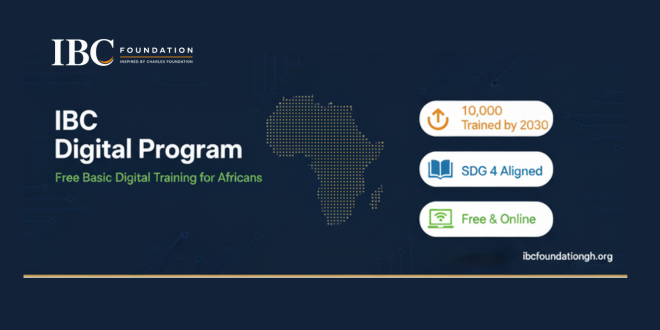
The foundation says the idea came from watching how quickly daily life, work and education have moved online, and how many people have been left struggling to keep up. In parts of Africa, tasks that many people take for granted are still unfamiliar. Writing and sending an email, attaching a résumé, uploading a document or setting up a professional online profile can be real obstacles for someone who has had little exposure to digital tools. When job applications and other opportunities increasingly require these skills, that gap can cost people chances they are otherwise qualified for.
To address this, the foundation has created the IBC Digital Program, which teaches practical skills in four areas: professional email communication, Canva and digital content creation, LinkedIn and building an online professional presence, and artificial intelligence.
The foundation says the aim goes beyond showing people which buttons to press. It wants participants to finish the program comfortable using technology, able to communicate professionally online and willing to go after opportunities they might once have avoided.
The initiative also has a volunteer component. People with strong digital skills are invited to serve as trainers and pass on what they know, which allows the program to reach more learners than a small team could on its own.
Ten thousand learners is a large goal, but the foundation describes the work as happening one person at a time. Each learner who sends a first professional email, uploads a document without help or applies for an opportunity online has gained a skill they can keep using.
The IBC Foundation is starting with digital literacy, with the aim of helping people turn what they learn into real opportunities.
To learn more about the foundation and its mission, visit ibcfoundationgh.org.

IPTV pricing is primary decision factor for cord-cutters evaluating alternatives to cable TV. Annual costs of £20-40 monthly for IPTV versus £70-100 for cable create compelling financial incentive to switch. However, pricing landscape is fragmented: tiered subscriptions, promotional offers, bundling options, hidden costs complicate true cost comparison. Understanding IPTV pricing structure is essential for identifying lowest total-cost-of-ownership option.
Market competition has driven prices down substantially since IPTV’s early days (2010-2015) when premium services cost £50+/month. Today’s competitive landscape features IPTV Smarters pro and dozens of competitors fighting for market share through aggressive pricing. Financial math favors IPTV decisively.
Cable TV Pricing Reality
US cable TV: £165/month average (€150, $165). UK cable: £40-50/month. France cable: €75-95/month. These prices include channels only—premium channels cost additional. Sports packages (usually EUR 15-25/month extra) are expensive. Equipment rental fees (£5-15/month) add up. Installation charges (£50-100 one-time). Promotional rates (first 12 months) are misleading—prices increase dramatically after promotional period ends.
Long-term costs are significant. Five-year cable TV cost: France €4,500-5,700 (at €75-95/month). UK five-year cost: £1,200-1,500. US five-year cost: $9,900-12,000 (£7,900-9,600). These are baseline without premium packages or sports access.
IPTV Service Pricing Breakdown
| Service Type | Monthly Cost | Annual Cost | Primary Content |
|---|---|---|---|
| Cable TV (France) | €75-95 | €900-1,140 | Linear + on-demand TV |
| IPTV Service (Premium) | €35-45 | €420-540 | Linear + VOD + international channels |
| IPTV Service (Standard) | €20-30 | €240-360 | Linear channels, basic VOD |
| IPTV + Netflix + Disney+ | €58-68 | €700-800 | Channels + premium streaming content |
| Streaming Only (3-4 services) | €45-55 | €540-660 | On-demand content only |
Hidden Costs Analysis
Streaming equipment cost: Firestick (£55-65 one-time), Android box (£40-60), or Smart TV (included). These last 3-5 years, amortizing to £1-2/month. Internet upgrade might be required: if connection is under 10 Mbps, upgrade necessary for reliable streaming (£10-20/month typically). VPN optional but recommended (£5-15/month). Device replacement after 5 years (one-time). Total hidden costs: £1-37/month depending on requirements.
Cable hidden costs are often larger: equipment rental (£5-15/month), installation (amortized: £2-3/month), premium channel packages (£15-30/month typical), sports access (£10-25/month typical). Total: £32-73/month in hidden costs beyond base price.
Financial Comparison: Five-Year Total Cost Analysis
Cable TV alone: €4,500-5,700 (France). IPTV Premium + Netflix + Disney+: €700-800/year × 5 = €3,500-4,000. Five-year savings: €500-2,200. Budget IPTV Service: €240-360/year × 5 = €1,200-1,800. Five-year savings: €2,700-4,500. These calculations assume equipment costs amortize within usage period.
Savings increase with family size. Family of four sharing single IPTV subscription: EUR 1,200-1,800 total (per-person EUR 300-450). Cable: EUR 4,500-5,700. Family savings: EUR 2,700-4,500 over five years (EUR 540-900 per person).
Premium vs Budget IPTV Services
Premium services (€35-45/month) typically offer more channels, better reliability, professional support, and regular updates. Services from established providers (Orange TV Now, major international IPTV services). Budget services (€20-30/month) offer core channels but might have reliability issues, limited support, or outdated app interfaces.
https://iptvsmartersprohub.com represents mid-tier approach: professional service (premium features, reliability, support) at moderate pricing. Value proposition: professional-grade service without premium price tag. Similar services compete on this positioning—quality at reasonable cost.
Promotional Pricing Traps
Avoid promotional pricing decisions. Cable TV often advertises €30/month first year, jumping to €80/month year two. Hidden contract cancellation fees (£100-200) trap customers. IPTV promotional pricing: some services offer €9-15/month introductory rates, increasing after 6-12 months. Read terms carefully. Calculate true long-term cost, not promotional rate.
Bundle Strategies
IPTV + streaming combines best of both: IPTV for live television, Netflix/Disney+/Prime for on-demand content. Combined cost (€58-68/month) is cheaper than cable TV (€75-95) while providing superior on-demand content. This bundled approach dominates European market in 2026.
IPTV smarters services bundled with streaming services offer convenience. Some platforms integrate with Netflix, Disney+ within single interface. Evaluate integrated offerings against separate subscriptions for cost comparison.
Frequently Asked Questions
Q: Is IPTV cheaper than cable TV really?
Yes. €35-45 IPTV vs €75-95 cable saves €40-60/month. Annual savings: €480-720. Five-year savings: €2,400-3,600 easily. Bundled IPTV + streaming (€58-68) still saves €10-40/month versus cable. Long-term savings are mathematically undeniable.
Q: What IPTV pricing should I avoid?
Avoid services costing under €10/month (often unreliable, poor support). Avoid services without free trial (no risk-free evaluation). Avoid services with long contract lock-in (prefer month-to-month). Avoid services with auto-renewing subscriptions (difficult to cancel). Reputable services are transparent about pricing and cancellation policy.
Q: Are annual IPTV subscriptions cheaper than monthly?
Usually 10-20% discount for annual prepayment. €35/month = €420/year. Annual discount often reduces to €350-380/year (saving €40-70). Financial advantage is modest. Choose based on commitment comfort level, not price optimization.
Q: What’s cheapest reliable IPTV service?
€20-30/month services are cheapest. Quality varies—some are excellent, others unreliable. Use trial period to test reliability before committing. Paying €35-45/month for premium service you trust beats saving €10-15/month on service experiencing frequent outages.
Technology
Digital Divide in French Education: IPTV Infrastructure Gaps Impact Rural Student Learning
Education & Technology Equity Analysis | August 2026 | 12-minute read
A rural school in Auvergne has 10 Mbps broadband. For 150 students. Peak hours? Maybe 2 Mbps per student if they’re lucky.
Meanwhile, Paris schools have fiber at 100+ Mbps.
This creates outcome disparity that doesn’t make obvious sense: technology quality shouldn’t vary this dramatically within the same country.
Yet it does.
Why Broadband Statistics Lie
“89% of rural France has broadband access” sounds good until you understand threshold: 25 Mbps minimum.
Rural schools operate at 10-15 Mbps. Technically “have broadband.” Practically insufficient for modern curriculum.
Modern curriculum means video-based learning. Science labs recorded as videos. Language instruction from native speakers. History lessons with historical footage. Mathematics walkthroughs.
All require streaming video. IPTV France optimized educational content could theoretically work at lower bandwidth, but requires deployment rural schools don’t have. Services at https://abonnementiptvsmartersproplayer.com/ demonstrate this potential but lack access to rural school infrastructure.
10 Mbps becomes a serious constraint when 30 students simultaneously attempt to watch 1080p educational content. You can’t. Network collapses.
The Cascading Problem
Teachers design curriculum for urban schools (adequate bandwidth). Assign video-based homework.
Rural students attempt homework on inadequate bandwidth. Video buffers. Quality degrades. Content inaccessible.
Rural students don’t do homework. Fall behind. Test scores decline. College preparation suffers.
This isn’t a technology problem. It’s an equity problem masked as technology problem.
Why General Broadband Investment Doesn’t Solve This
Household broadband investment (Fiber-To-The-Home) benefits Netflix consumption. School broadband requirements are different.
Schools need: 100+ Mbps sustained capacity during school hours, reliability (near-zero downtime), optimization for classroom environments (low latency, quality consistency).
Household broadband designed for: variable demand, consumer tolerance for occasional buffering, price optimization.
Requirements misalign. So household fiber deployment doesn’t automatically solve school bandwidth needs.
Rural schools still stuck with insufficient bandwidth despite general broadband expansion. Specialized IPTV smarters infrastructure remains unavailable.
The IPTV Solution (Which Could Actually Work)
Educational IPTV platforms specifically optimize for school environments. Lower bandwidth requirements through efficient streaming protocols, local caching of common content, prioritization of educational uses.
Rural school with 15 Mbps total bandwidth. Deploy IPTV infrastructure locally. Educational content cached on school servers. Bandwidth requirements drop dramatically.
Same school with general-purpose broadband? Can’t stream Netflix efficiently. Can’t stream YouTube reliably. Can stream IPTV-optimized educational content smoothly.
This is structural difference. Educational IPTV designed for constrained bandwidth environments. General streaming designed for unconstrained.
What Actually Needs To Happen (And Won’t)
Schools need dedicated broadband infrastructure investment separate from household deployment.
Governments need to fund school-specific networks requiring 100+ Mbps availability.
Universities need to partner with schools providing educational IPTV content.
None of this is happening with necessary urgency.
Policy discussions focus on household fiber (consumer benefits are obvious). School broadband remains deprioritized (benefits are measurable but less politically visible).
The Equity Problem (Which Is Unresolved)
Technology literacy correlates strongly with future outcomes. Rural students without technology familiarity develop STEM skills slower. College STEM programs remain out of reach. Career options narrow.
Infrastructure gap becomes perpetual disadvantage.
This is solvable. Schools could get adequate infrastructure. Governments could prioritize it. But they’re not.
So rural-urban outcome disparity persists, justified by statistics that claim rural broadband is “adequate.”
It’s not adequate. Just adequate at lying about adequacy.
Frequently Asked Questions
Q: Why can’t rural schools just use Netflix for educational content?
Netflix requires 5-6 Mbps per simultaneous stream. 30 students need 150-180 Mbps. Rural schools have 15 Mbps total. Math doesn’t work.
Q: Can educational content be downloaded instead of streamed?
In theory yes. In practice, pre-downloading requires advanced planning. Teachers can’t assign new content spontaneously. System lacks flexibility.
Q: How much does school-focused broadband infrastructure cost?
Significant. Hundreds of millions for nationwide deployment. But less than lost economic opportunity from rural students falling behind urban peers.
Q: Would IPTV infrastructure actually solve rural education gaps?
Partially. It enables curriculum modernization at constrained bandwidth. But it’s not complete solution. Structural investment in education remains necessary.
Q: Why hasn’t France addressed this gap yet?
Urban bias in policy. Urban voters are larger constituency. Rural problems less politically visible. Classic structural inequality.

The Inspired by Charles Foundation (IBC Foundation) has launched a digital literacy initiative with a target of training 10,000 Africans by 2030

IPTV Pricing 2026: Real Costs Compared to Cable TV and Streaming Services

Digital Divide in French Education: IPTV Infrastructure Gaps Impact Rural Student Learning

Why Choose Leadburst Digital as Your Lead Generation Agency?

Catch-Up TV and Replay on IPTV Smarters Pro: How to Watch Missed French Programmes in 2026

M3U vs Xtream Codes API: Which IPTV Connection Method Works Better for French Subscribers?
Quelle Application IPTV Choisir pour sa Smart TV en France : Comparatif 2026

Why Smaller Teams Are Outperforming Larger Organizations: Sabeer Nelli Explains the Shift

Modern Interior Design Services in Bangkok: Transform Your Space Today

TiviMate Catch-Up TV: How Terugkijken Works for Belgian and Dutch Viewers (And When It Does Not)

Paying for IPTV in the Netherlands: iDEAL, Cancellation Rights, and What Your Provider Owes You
How to Watch Dutch and Belgian TV During Your Vacation (Without a VPN That Half-Works)
IPTV for Dutch Families: Children’s Channels, Parental Controls, and What Parents Actually Need to Know
The Dutch Sports Fan’s Television Problem (And Why IPTV Is the Only Honest Answer)
How IPTV is Transforming Home Entertainment Across the Netherlands: A Complete Practical Guide for Dutch Viewers in 2026
Is Trading Is The Best Investment Option After Retirement?

The Ultimate Guide to 35mm Film Developing Lab

10 Things to Do in Punta Mita

Save on Campervan Rentals with a roadsurfer Gutscheincode

Tailored Tours to Switzerland | Private & VVIP Experiences

Best Things to Do in New York City – Ultimate Travel Guide

Explore New Real Estate Programs in Marrakech

Why is there a white spot on my laptop screen?

How to Be the Best Real Estate Agent Murfreesboro

Find the Best Real Estate Agents Main Line

Guide to Buying Testosterone Propionate Safely and Effectively

6×7

Effective Property Management in Marrakech Morocco

Throne Of Seal Insert E108 Pan Xiuyu

Shana Roberts Northbrook | Discover Her Story
-
 News6 months ago
The Dutch Sports Fan’s Television Problem (And Why IPTV Is the Only Honest Answer)
-
 Technology6 months ago
How to Watch Dutch and Belgian TV During Your Vacation (Without a VPN That Half-Works)
-
 Technology7 months ago
How IPTV is Transforming Home Entertainment Across the Netherlands: A Complete Practical Guide for Dutch Viewers in 2026
-
Technology7 months ago
The Dutch Viewer’s Complete Guide to IPTV: What It Is, How It Works, What You Can Watch, and What to Expect Before You Start
-
 Technology6 months ago
IPTV for Dutch Families: Children’s Channels, Parental Controls, and What Parents Actually Need to Know
-
Technology6 months ago
Quelle Application IPTV Choisir pour sa Smart TV en France : Comparatif 2026
-
 Technology6 months ago
Paying for IPTV in the Netherlands: iDEAL, Cancellation Rights, and What Your Provider Owes You
-
Technology4 months ago
Catch-Up TV and Replay on IPTV Smarters Pro: How to Watch Missed French Programmes in 2026